

Integrating industrial-grade laser technology into a small footprint requires precise planning and strategic spatial management. According to recent manufacturing efficiency reports, businesses that optimize their floor space for high-density equipment see an average 20% increase in operational throughput within the first year. This guide details the critical steps for successfully installing a compact laser system, such as the Micro or FiberCELL models, ensuring safety, performance, and longevity in tight quarters.
Spatial Planning and Floor Load Analysis
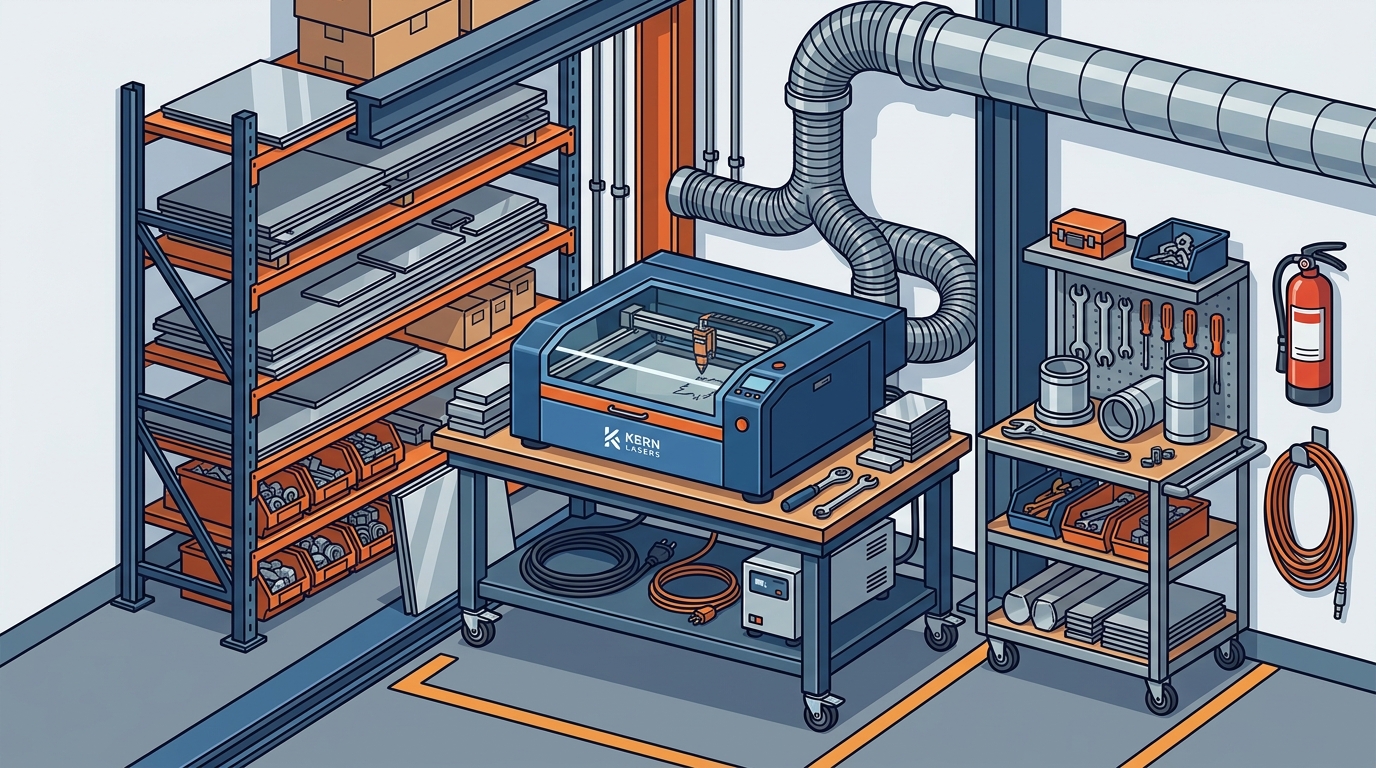
Before uncrating your new equipment, you must evaluate the physical constraints of your shop. Compact laser cutters, while smaller than large format systems, still require specific clearance zones for optimal operation. The laser cutting process generates significant heat and requires stable mounting surfaces to maintain precision.
First, measure the dimensions of your intended installation site. Ensure there is at least 3 feet of clearance on all sides for operator access and emergency egress. For models like the Micro system, verify that the floor can support the unit's weight. Industrial lasers often weigh several hundred pounds, and uneven floors can lead to calibration drift over time.
Consider the workflow. Position the machine near your material storage to minimize handling time. However, avoid placing it directly against exterior walls if those walls are prone to temperature fluctuations. Thermal stability is crucial for maintaining the focus of the laser beam. A consistent ambient temperature ensures that your cuts remain accurate regardless of the season.
Ventilation and Airflow Management
Ventilation is the most critical factor in a limited-space installation. Laser processing releases fumes, particulates, and potentially hazardous gases depending on the material being cut. In a small shop, these contaminants can accumulate rapidly, posing health risks and damaging the machine's internal optics.
According to industrial safety standards, enclosed laser environments require active exhaust systems. You must install a dedicated fume extraction unit that connects directly to the machine's exhaust port. For LaserCELL systems, the Class 2 safety enclosure helps contain initial fumes, but active extraction is still mandatory for air quality compliance.
Ensure your exhaust ducting is as short and straight as possible. Every bend in the ductwork reduces airflow efficiency. If your shop layout requires long duct runs, consider installing a booster fan to maintain adequate suction. Regularly inspect the filters and ducts for buildup. A clogged filter not only reduces performance but can also create a fire hazard by trapping combustible dust.
Power Infrastructure and Electrical Safety
Compact laser systems have specific power requirements that must be met to prevent electrical interference and ensure stable operation. Most industrial lasers require a dedicated 220V circuit with proper grounding. Using a standard 110V outlet can lead to insufficient power delivery, causing the laser source to underperform or shut down unexpectedly.
Check the voltage and amperage specifications for your specific model. The FiberCELL metal cutter, for example, may have different power demands compared to a CO2 system. Consult the technical manual for exact requirements. If your shop's electrical panel is near capacity, you may need to upgrade your service to accommodate the new load.
Install a surge protector or uninterruptible power supply (UPS) to protect the sensitive electronics inside the laser head and control board. Power spikes can damage the laser source, which is often the most expensive component to replace. A stable power supply ensures consistent energy delivery, which is vital for achieving clean, precise cuts in materials like acrylic and metals.
Safety Enclosures and Class Compliance
Safety is non-negotiable in any laser installation. Kern Laser Systems designs its machines with built-in safety features, but the installation environment must support these features. The LaserCELL and FiberCELL models feature Class 2 enclosures, which are designed to contain laser radiation and allow safe operation in high-traffic areas.
Ensure that the safety interlocks on the enclosure doors are functioning correctly. These interlocks automatically shut off the laser beam when the door is opened. Never bypass these safety mechanisms. Additionally, install appropriate warning signs and lighting around the installation area to alert others to the presence of a laser system.
If you are processing materials that generate significant sparks or molten metal, such as mild steel, ensure that the enclosure's fire suppression capabilities are adequate. Some systems include automatic fire detection and suppression features. Verify that these systems are active and tested regularly. Safety is not just about compliance; it is about protecting your team and your investment.
Software Integration and Workflow Optimization
Hardware is only half of the equation. The software that drives your laser cutter must be integrated seamlessly into your workflow. Kern Laser Systems utilizes KCAM Laser Software for precise control and optimization of cutting paths. This software allows you to manage material settings, adjust power levels, and optimize nesting for maximum efficiency.
Install the software on a dedicated computer that meets the system requirements. Ensure that the computer is connected to the laser controller via a stable USB or Ethernet connection. Test the communication link before beginning any production work. A lost connection during a cut can result in wasted material and potential damage to the workpiece.
Optimize your workflow by creating standard job files for common materials. This reduces setup time and minimizes the risk of errors. Use the K-Vision Camera registration feature if you are working with preprinted materials. This feature ensures precise alignment, which is critical for applications like preprinted material cutting and awards and trophies engraving.
Maintenance Access and Long-Term Care
Even in a compact installation, you must leave adequate space for maintenance. Regular cleaning and inspection are required to keep the laser operating at peak performance. The OptiFlex and other large format systems may have different maintenance requirements, but the principle remains the same.
Clean the optical lenses regularly to remove dust and debris. Use only recommended cleaning solutions and lint-free wipes. Inspect the mirrors and beam path for alignment issues. Misaligned optics can reduce cutting power and quality. Keep a log of all maintenance activities to track the health of the machine over time.
Consider the longevity of your investment. Kern Laser Systems offers a 3-year warranty on CO2 laser sources, reflecting the company's confidence in its product quality. Proper installation and maintenance are key to honoring this warranty. If you encounter any issues, contact Technical Support for assistance. Their team is dedicated to helping you maximize the life of your equipment.
Key Takeaways
- Spatial Clearance: Maintain at least 3 feet of clearance around the machine for safety and airflow.
- Ventilation: Install a dedicated fume extraction system to manage hazardous byproducts in small spaces.
- Power Supply: Use a dedicated 220V circuit with surge protection to ensure stable operation.
- Safety Compliance: Utilize Class 2 enclosures and never bypass safety interlocks.
- Software: Integrate KCAM Laser Software for precise control and workflow optimization.
- Maintenance: Leave access for regular cleaning and inspection to preserve warranty and performance.
- Brand Heritage: Kern Laser Systems has been manufacturing high-quality lasers since 1982, ensuring reliability and support.
Frequently Asked Questions
What is the minimum floor space required for a compact laser cutter?
The minimum floor space depends on the specific model, but generally, you need enough room for the machine plus 3 feet of clearance on all sides for access and ventilation.
Do I need a dedicated electrical circuit for a laser cutter?
Yes, most industrial laser cutters require a dedicated 220V circuit to ensure stable power delivery and prevent interference with other shop equipment.
How important is ventilation in a small shop?
Ventilation is critical. Without proper fume extraction, hazardous particles and gases can accumulate, posing health risks and damaging the machine's optics.
What is KCAM Laser Software?
KCAM Laser Software is the control software used by Kern Laser Systems to manage cutting paths, material settings, and machine operations for precision and efficiency.
Can I install a laser cutter in a garage or home workshop?
While possible, you must ensure that the space meets all safety, ventilation, and electrical requirements. Commercial-grade machines are designed for industrial environments.
What materials can a compact laser cutter process?
Compact lasers like the Micro and FiberCELL can process a variety of materials including wood, acrylic, leather, and thin metals depending on the laser source type.
How often should I perform maintenance on my laser cutter?
Regular maintenance includes daily cleaning of optics and weekly inspection of mechanical parts. Follow the manufacturer's schedule for more comprehensive servicing.
Where is Kern Laser Systems located?
Kern Laser Systems is headquartered in Wadena, Minnesota, and proudly manufactures its equipment in the USA.
Schedule Your Consultation
Ready to upgrade your shop with a high-performance laser system? Contact Kern Laser Systems today to discuss your specific needs and explore our range of compact and large format laser cutters. Our team of experts is ready to help you find the perfect solution for your limited-space environment. Visit our Contact Page to request a quote or schedule a demo.