
Common Mistakes in Automating Acrylic Laser Cutting and How to Avoid Them
Integrating automation into acrylic laser cutting operations is no longer a luxury but a necessity for high-volume production environments. According to recent industrial manufacturing reports, facilities that successfully automate CO2 laser workflows often see a 40% increase in throughput within the first year of implementation. However, the transition from manual loading to fully automated systems is fraught with technical hurdles. Many manufacturers underestimate the complexity of material handling, software integration, and thermal management. This guide details the critical errors that stall production and provides actionable strategies to optimize your automated acrylic cutting process. (Kern Customer Login Area)
Why Automation Projects Fail
The primary reason automated acrylic cutting projects fail is a misalignment between operational goals and technical capabilities. Manufacturers often attempt to automate processes without first standardizing their manual workflows. If the manual process is inefficient, automating it only accelerates inefficiency. Automation is a multiplier, not a magic wand. Before investing in robotic arms or automated sheet loaders, you must ensure your laser parameters, material specifications, and design files are consistent.
Another common failure point is the lack of clear ROI metrics. Acrylic is a versatile material, but it behaves differently than metal or wood. It requires precise power settings to avoid melting or charring. Without a clear understanding of these material properties, automated systems may produce inconsistent results, leading to high scrap rates and wasted material costs.
Material Handling and Feeding Errors
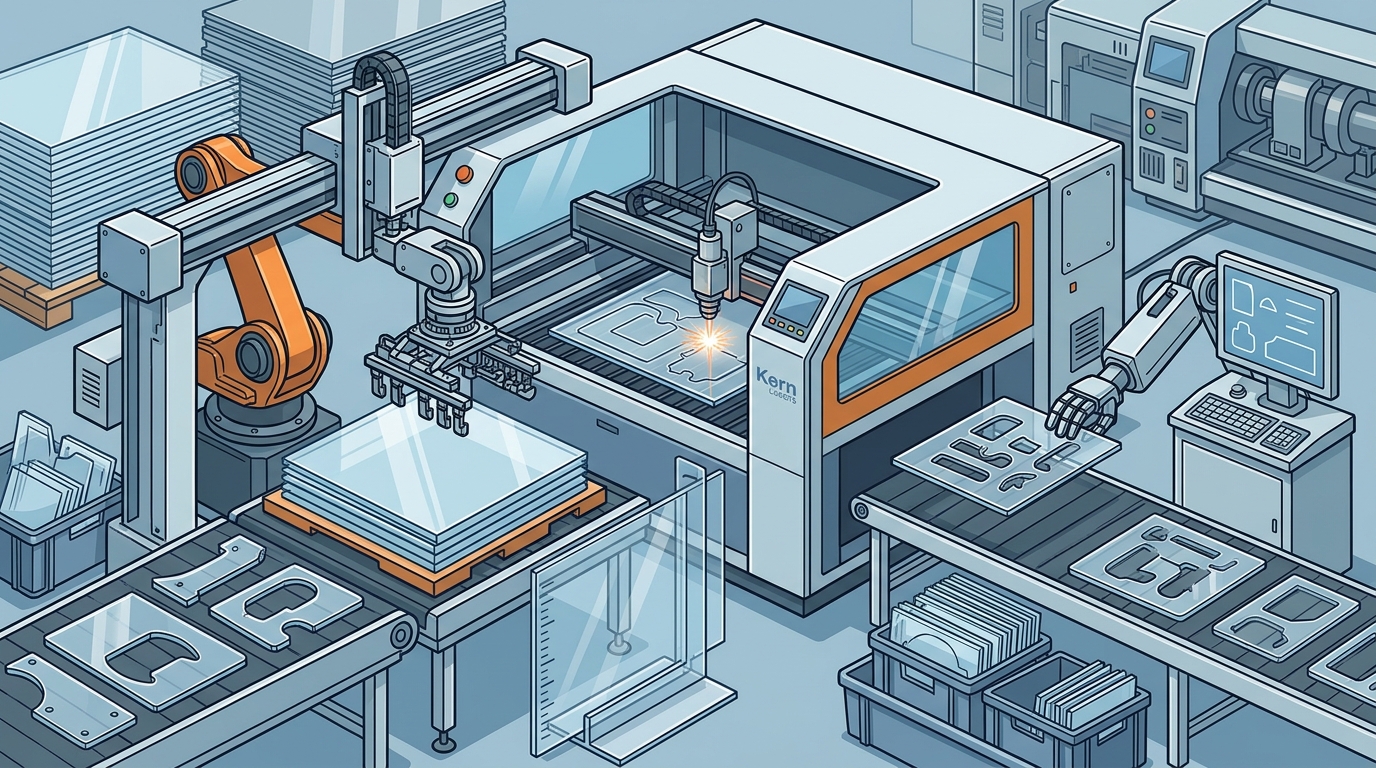
Acrylic sheets vary in thickness, surface quality, and static charge. One of the most frequent mistakes in automation is ignoring the physical properties of the material during the feeding process. Automated sheet loaders must be calibrated to handle the specific weight and friction coefficients of the acrylic sheets being used.
Static Charge Issues
Acrylic is highly susceptible to static electricity. When sheets are stacked in an automated magazine, static can cause them to stick together. This leads to double-feeding errors, where the system attempts to load two sheets at once. This can jam the machine, damage the laser lens, or result in poor cut quality. Implementing ionizing bars or anti-static rollers in the feeding path is essential for smooth operation.
Sheet Flatness and Warping
Acrylic sheets can warp due to temperature fluctuations or improper storage. An automated system that relies on vacuum hold-downs may struggle to maintain suction on warped sheets. This results in inconsistent cutting depths and poor edge quality. Always store acrylic in a climate-controlled environment and inspect sheets for flatness before loading them into the automated system.
Software and Path Planning Pitfalls
Hardware is only half the equation. The software driving the automation must be robust enough to handle complex nesting algorithms and real-time adjustments. Many manufacturers use generic CAM software that does not account for the specific thermal expansion of acrylic.
Inefficient Nesting
Poor nesting leads to excessive material waste. Acrylic is expensive, and inefficient nesting can erode profit margins significantly. Advanced nesting software can optimize part placement to minimize waste, but it must be integrated with the laser control system. Kern Laser Systems offers KCAM Laser Software designed to enhance precision and efficiency in laser cutting operations.
Path Planning for Acrylic
Acrylic cuts differently than other materials. The laser path must account for the heat-affected zone (HAZ). If the path planning software does not adjust for this, you may see yellowing or charring on the edges. Ensure your software allows for fine-tuning of power and speed settings based on the specific type of acrylic, whether it is cast or extruded.
Thermal Management and Heat Buildup
Acrylic has a low melting point compared to metals. During automated cutting, heat builds up rapidly in the material. If this heat is not managed, it can cause the acrylic to melt, drip, or even catch fire. This is particularly problematic in high-speed automated environments where the laser moves quickly across the sheet.
Air Assist Optimization
Air assist is critical for removing molten material from the cut kerf. In automated systems, the air assist pressure must be calibrated correctly. Too little pressure results in poor cut quality and potential fire hazards. Too much pressure can cool the cut too quickly, leading to stress fractures in the acrylic. Regularly check your air assist nozzles for clogs and ensure the pressure is consistent.
Chiller Performance
The laser source itself generates heat. If the chiller system is not performing optimally, the laser power output can fluctuate. This leads to inconsistent cut depths and widths. Monitor your chiller’s temperature and coolant levels daily. A stable laser source is essential for consistent automation results.
Neglecting Preventive Maintenance
Automated systems require more rigorous maintenance than manual ones. The increased throughput means more wear and tear on components. Many manufacturers neglect preventive maintenance until a breakdown occurs, leading to costly downtime.
Optical Component Care
The lenses and mirrors in your laser system must be kept clean. Acrylic cutting produces fumes and particulates that can deposit on optical components. This reduces laser power and can cause damage. Implement a strict cleaning schedule for all optical parts. Use only recommended cleaning solutions and materials to avoid scratching the lenses.
Mechanical Component Lubrication
The rails, gears, and belts in your automated system require regular lubrication. Lack of lubrication leads to increased friction, wear, and eventual failure. Follow the manufacturer’s guidelines for lubrication intervals and types. Kern Laser Systems provides comprehensive Technical Support and maintenance resources to help you keep your equipment in peak condition.
Choosing the Right Automated System
Not all laser systems are created equal. When selecting a system for automated acrylic cutting, consider the following factors:
| System Type | Best For | Automation Compatibility | Key Consideration |
|---|---|---|---|
| OptiFlex | High-volume acrylic cutting | High | Versatile and powerful for various materials |
| LaserCELL | Safety-focused environments | Medium | Enclosed design for safe operation |
| FiberCELL | Metal cutting | High | Not suitable for acrylic |
| EcoFlex | Entry-level large format | Medium | Economical but may require more manual intervention |
The OptiFlex is widely regarded as the most popular choice for automated acrylic cutting due to its high performance and versatility. It features a large format that accommodates standard sheet sizes and offers precise control over cutting parameters. For environments where safety is a primary concern, the LaserCELL provides a fully enclosed design that meets Class 2 safety standards.
Key Takeaways
- Standardize First: Ensure your manual processes are optimized before automating them.
- Manage Static: Use ionizing bars to prevent acrylic sheets from sticking in automated feeders.
- Optimize Nesting: Use advanced software to minimize material waste and maximize throughput.
- Control Heat: Monitor air assist pressure and chiller performance to prevent melting and charring.
- Maintain Rigorously: Implement a strict preventive maintenance schedule for optical and mechanical components.
- Choose Wisely: Select a laser system that matches your specific material and volume requirements.
- Train Staff: Ensure operators are trained on both the hardware and software aspects of automation.
Frequently Asked Questions
What is the best laser type for automated acrylic cutting?
CO2 lasers are the industry standard for acrylic cutting because they provide clean, polished edges without the need for post-processing. Fiber lasers are generally not suitable for acrylic as they are designed for metal cutting.
How do I prevent acrylic from melting during automated cutting?
Prevent melting by optimizing your air assist pressure, adjusting laser power and speed settings, and ensuring your chiller system is functioning correctly. Regular maintenance of optical components also helps maintain consistent power output.
Can I automate an existing laser cutting machine?
Yes, many existing laser cutting machines can be retrofitted with automated sheet loaders and robotic arms. However, it is important to ensure compatibility with your machine’s control system and software.
What is the role of KCAM software in automation?
KCAM software plays a crucial role in automation by providing precise control over laser parameters, optimizing nesting algorithms, and facilitating seamless integration with automated hardware.
How often should I clean the laser lenses?
Laser lenses should be cleaned regularly, ideally after every shift or when cutting high-volume jobs. Accumulated fumes and particulates can significantly reduce laser power and cut quality.
What are the safety considerations for automated acrylic cutting?
Safety considerations include proper ventilation to remove fumes, use of enclosed systems to protect operators from laser radiation, and regular inspection of safety interlocks and emergency stop mechanisms.
Does Kern Laser Systems offer support for automation integration?
Yes, Kern Laser Systems provides comprehensive support for automation integration, including technical assistance, training, and maintenance resources to ensure your automated system operates efficiently.
Start Your Automation Journey
Avoiding common mistakes in automating acrylic laser cutting requires careful planning, precise execution, and ongoing maintenance. By addressing material handling, software integration, and thermal management issues, you can unlock the full potential of your automated workflow. Kern Laser Systems has been a trusted name in the laser industry since 1982, providing high-quality, made-in-the-USA laser cutting solutions. Contact us today to discuss how our OptiFlex or LaserCELL systems can transform your acrylic cutting operations.